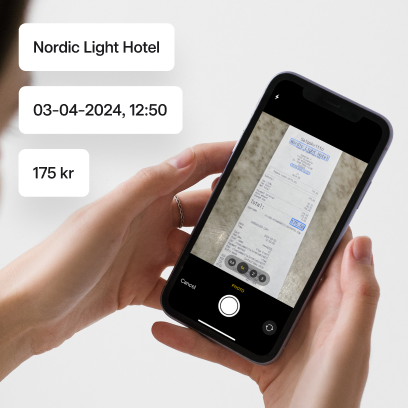


In Mynt, you can easily manage all types of company expenses, including expenses made by employees with private funds. In order for the expenses to be registered in Mynt, the employee needs to create a new expense and upload the corresponding receipt. Want to see how it works? Watch the video that shows you how to manage private expenses step by step.
How to make a private expense in Mynt
1. Use of private funds
When purchasing a service, employees can use their private card or cash for payment.
2. Photograph the receipt
Immediately after the purchase, take a photo of the receipt in the app.
3. Automatic receipt interpretation
AI is used to interpret the receipt, and important information such as the date, amount and place of purchase is automatically entered into the system.
4. Approval by authoriser
An authoriser reviews the purchase and can either approve or reject the expense directly via the app or on the company's web portal.
5. Export to the accounting system
Once the expense has been approved, multiple transactions can be exported to the accounting system with a single click.
6. Payment
Export payment files directly to your payroll system to reimburse employees. Then mark the expense as paid in Mynt.
Through this simple process, the company can efficiently and smoothly manage private expenses without missing any details or delaying reimbursements to employees.
Frequently asked questions and answers about private expenses
What are out-of-pocket expenses?
Out-of-pocket expenses occur when employees use their own funds, such as a personal card or cash, to make purchases on behalf of the company. This can be practical when company cards are not available or if the company is temporarily unable to cover the cost directly. With Mynt's Out-of-pocket Expenses feature, all expenses can be managed easily and smoothly in one place, regardless of the payment method.
Examples of out-of-pocket expenses
- Expenses incurred on business trips, such as hotels, trains and flights, food
- Office supplies, such as computers, telephones, printer paper
- Entertainment expenses, such as customer lunches or dinners
Do you have to save receipts for personal expenses?
Yes and no. You need to save a digital copy of your receipt, as the expense must be recorded. When you use Mynt, the receipt is automatically saved in the app, so you don't need to save your own copy.
Read more about Out-of-pocket expenses in Mynt here.